
中文版: Atoll:将 MacBook 刘海变成高能控制中心
When Apple introduced the display notch on the redesigned MacBook Pro, the reaction was divided: some people ignored it, some hid it behind menu bar blacking utilities, and some wondered why it couldn’t do what the iPhone’s Dynamic Island does.
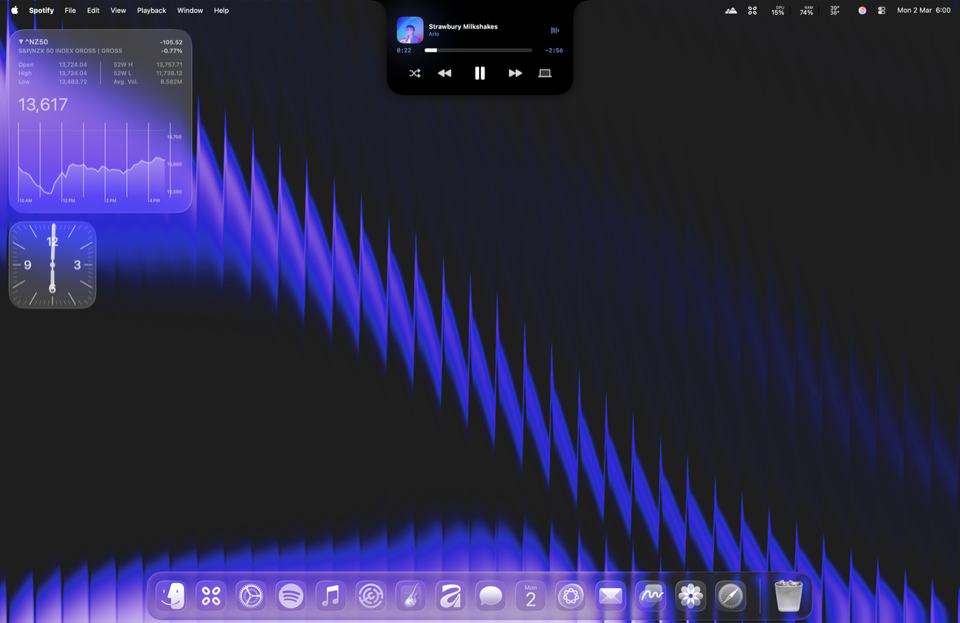
Most attempts to bring Dynamic Island features to macOS end up feeling like gimmicks—floating HUDs that get in the way of your cursor or clutter an already busy menu bar. But I recently came across Atoll (by Ebullioscopic), an open-source macOS utility written natively in SwiftUI, and it represents one of the cleanest takes on turning that dead screen real estate into a practical command surface.
What Makes It Work
Atoll doesn’t try to be an omnipresent widget layer. By default, it stays flush against the physical notch and stays completely out of the way. Hover near the notch or click, and it expands with snappy, responsive SwiftUI transitions into a multi-tab control center.
Here is what it brings right to your screen’s bezel:
- System Health & Hardware Stats: Instead of keeping menu bar icons for per-core CPU load, GPU usage, RAM, and thermals, Atoll integrates lightweight monitoring directly. It pulls CPU temperature via SMC access and frequency sampling through IOReport bindings (adapted from the popular Stats open-source utility).
- Media Playback & Live Visualizer: Clean playback controls for Apple Music, Spotify, and other media sources with inline album art and an optional C++ live music visualizer (via rtaudio).
- Quick File Shelf / Dock: A temporary drop zone for files. You can drag and drop files onto the notch, or pipe them straight from Terminal using
open -a Atoll /path/to/filewhen staging files for upload or transfer. - Desktop Utilities: Fast-access clipboard history, multi-stop timers/stopwatches with iOS-style lock screen widget mirrors, and calendar agenda previews.
- Mini Terminal & LLM Tracking: It even embeds a quick terminal tab (powered by SwiftTerm) and LLM token usage tracking hooks via OpenUsage/OpenRouter.
- Extensibility (AtollExtensionKit): For developers, it exposes a Swift SDK and RPC bindings (
atoll-js) allowing third-party apps and scripts to push custom Live Activities and lock screen widgets into the notch without writing UI boilerplate.
Why It’s Worth Keeping
What I appreciate most about Atoll is its architectural honesty. Rather than reinventing the wheel, the project openly builds upon solid open-source foundations—integrating elements from Boring.Notch, Alcove, Stats, and SwiftTerm into a cohesive, native app that feels like a natural extension of macOS rather than an overlay hack.
If you have a notched MacBook and want practical utilities within muscle memory without cluttering your menu bar or desktop, it is well worth checking out.
- Official Website: getatoll.app
- GitHub Repository: Ebullioscopic/Atoll
- Install: Download the latest DMG from GitHub Releases or via Homebrew (
brew install --cask atoll). - App Collection Entry: Atoll on icsteve.com
Related posts